Top 6 Grammarly Alternatives: Which tool is the Best Choice for You?
Updated: 02 Feb 2026
Grammarly is an excellent tool for helping millions of writers correct errors in their content and improve their writing. Many people, including myself, find it to be expensive and somewhat limited. The Grammarly premium plan costs $30 per month when billed on a month-to-month basis and only supports English. Many writers desire software that not only corrects errors but also supports multiple languages and provides advanced style tips.
The demand for smarter, more affordable editing tools has never been higher. Writers today want software like Grammarly that not only corrects mistakes but also offers advanced style guidance, multilingual support, and privacy-conscious features. Bloggers, students, and professionals are increasingly turning to Grammarly alternatives that stretch their budgets while expanding their creative opportunities.
Table of Contents
Why Writers Are Quitting Grammarly
Grammarly has helped millions of people improve their writing, but it isn’t perfect for everyone. More and more writers are looking for alternatives, and here’s why:
1. It’s Too Expensive
Grammarly Premium plan costs approximately $144 a year if billed annually, while monthly plans have risen to $30 per month. For many people, that is a significant amount of money to correct spelling and grammar.
The Problem: The free version is quite basic. If you want advanced features like plagiarism detection or full-sentence rewrites, you have to pay the high price.
2. It Doesn’t Understand “Pro” Writing
Grammarly is built for general writing, but it struggles with special projects.
Science and School: It often doesn’t recognize niche scientific terminology or the high-level formal tone required in graduate-level academic papers.
Losing Your Voice: Sometimes Grammarly tries to make everything so simple that the writing sounds boring, repetitive, or “robotic.”
Language: It is mostly made for English, so it’s not great if you write in other languages.
3. Privacy and Safety
When you type into Grammarly, your words go onto their computers.
Training the Robot: Grammarly uses your data to train its generative AI. Many people don’t want their private ideas or confidential company data used to train a model.
Must be Online: You have to be connected to the internet to use it. Some people prefer tools that work “offline” so their data stays safe on their own computer.
4. Technical Problems
Grammarly doesn’t work well with all types of files.
Too Bossy: Sometimes Grammarly is “too aggressive.” It tries to change stylistic choices that are already correct, which can actually create new mistakes.
Wrong Files: It struggles with Markdown files and LaTeX documents used by developers and scientists.
What Are the Criteria for Choosing the Best Grammarly Alternatives?
Choosing the right tool is about more than just finding a cheaper version of Grammarly. To find the best fit for your writing, look for these simple things.
- The “Where Do I Write?” Test: A tool is only good if it works where you already spend your time. Does it work in your email (Gmail/Outlook), on social media, and in your document editor (Word/Google Docs)?
- The Accuracy Test: AI can sometimes be “confidently wrong.” To see if a tool is smart, paste this sentence into it: “Their is no way to know if your going to like there gift, but its the thought that counts.” A good tool should catch all four errors: There, you’re, their, and it’s.
- The Workflow Test: When you have a long document, you don’t want to click “Accept” 50 times. Look for a “Fix All” button that lets you resolve basic spelling errors with one click.
- The Privacy Check: Check the settings: Does it use your personal writing to train its AI? Privacy-focused tools are better for sensitive work.
- The “Free vs. Paid” Value: Many Grammarly alternatives are popular because they offer more for free. Check the word limits; if the free version caps you at 500 words per day, it may not be enough for your needs.
What Are the Best Grammarly Competitors?
Here’s a quick overview of tools that are alternatives to Grammarly, highlighting their strong features for writers, students, and professionals.
ProWritingAid
ProWritingAid is a more powerful Grammarly dupes because it focuses on much more than fast corrections. Each suggestion explains how it improves your writing. Like Jasper, a popular AI writing assistant, ProWritingAid also supports creators with editing and content improvement.
- Beyond Quick Fixes
ProWritingAid acts like a personal writing mentor that helps you grow your skills through detailed reports on style, readability, and structure. - Main Features
It offers checks for writing style, grammar, repeated words, readability, consistency, pacing, dialogue tags, and a contextual thesaurus. - Broad Integration
It connects with Word, Google Docs, Scrivener, Open Office, and web browsers such as Chrome and Firefox. - Strengths and Weaknesses
It delivers detailed feedback, but it can feel heavy for short edits or slow when handling very long documents. - Best For Dedicated Writers
It suits authors, students, bloggers, and professionals who want to sharpen and polish their writing.

QuillBot
Here are the reasons why QuillBot is more than a paraphrasing tool. More than 50 million people use it to save time and enhance productivity.
What makes QuillBot software like Grammarly?
- Generates rewritten text in seconds.
- Includes paraphrasing, grammar, plagiarism, and more.
- Produces natural and original text.
- Lets you tweak tone and words.
- Offers both free and low-cost premium plans.
Key Features of QuillBot
- Simple interface
- Strong data privacy
- Regeneration of results
- Tone adjustments (formal, academic, simple, creative, etc.)
- Browser and app integrations
- Multi-language support
- Side-by-side output comparisons
Pricing Plans
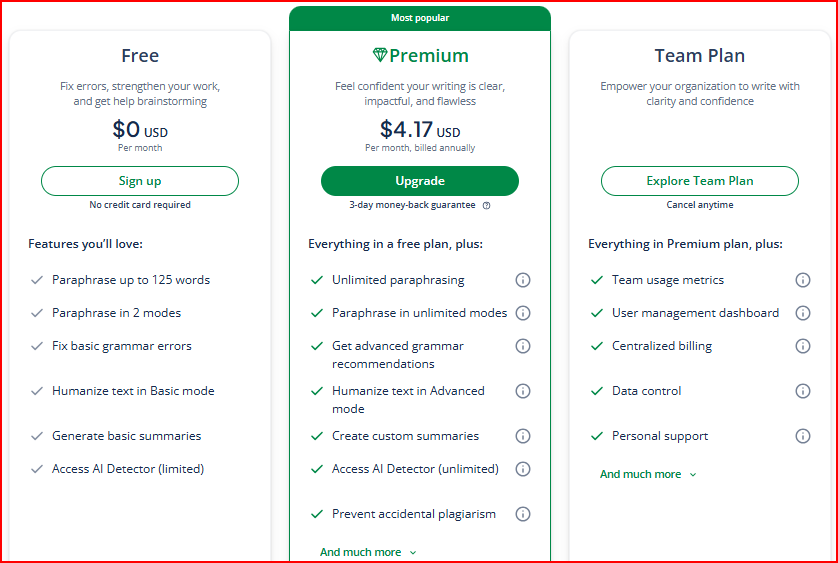
- Free Plan: $0, with limits (125 words for paraphrasing, 1200 words for summarizing).
- Premium Plan: $4.17/month (annual billing). Removes limits, extends summarizer to 6000 words.
- 3-day money-back guarantee included.
LanguageTool
Here are the features that make it a strong option as an Alternative to Grammarly :
Key Features of LanguageTool
- It works with more than 30 languages.
- Identifies the correct language after analysing a few words.
- Add up to 25,000 custom words.
- Create custom writing rules for consistency.
- Local setup available with Docker for privacy-focused users.
Pricing Plans
- Free: Covers grammar and punctuation in more than 25 languages with a 10,000 character limit per check.
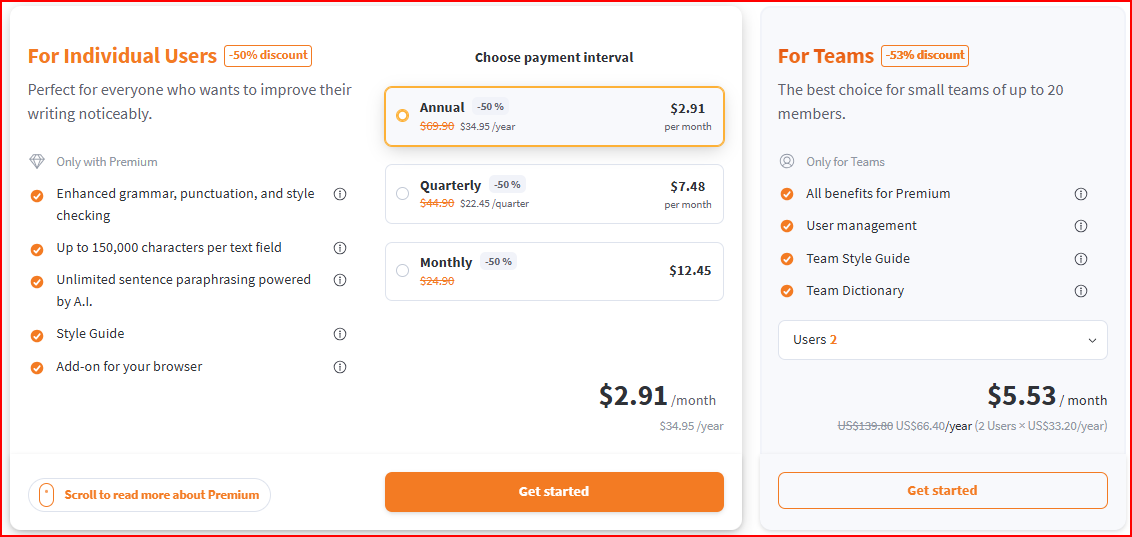
- Premium: $2.91/month (annual). Expands to 150,000 characters and advanced style suggestions.
- Team Plan: From $5.53/user/month. Includes shared dictionaries and style guides.
Hemingway Editor
Here are the features that make it a strong option for writers who value clarity and prefer alternatives to Grammarly.
Key Features of Hemingway
- Highlights long or hard-to-read sentences.
- Flags adverbs, passive voice, and complex phrases.
- Uses color coding: yellow for lengthy sentences, red for very hard ones, blue for adverbs, green for passive voice, and purple for complex words.
- Rates your text with a readability grade level.
- Available as a free online editor or a one-time desktop app.
Pricing Plans
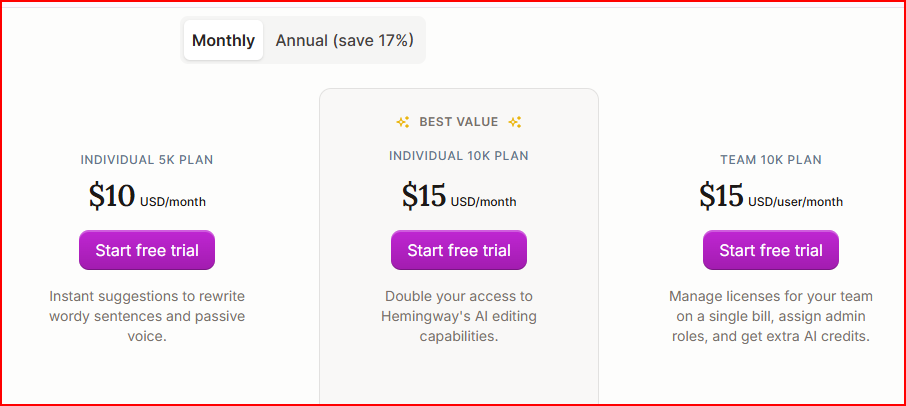
- Free Plan: Online version with full highlighting and readability grading.
Ginger Software
Ginger Software is a popular Grammarly alternative that offers helpful features like a Personal Trainer and sentence rephrasing tools. It is especially useful for non-native English writers and anyone who needs more than basic grammar checking to improve their writing.
Key Features of Ginger
- Corrects grammar, spelling, and punctuation in real time.
- Offers sentence rephrasing for clearer alternatives.
- Includes a built-in translation tool for over 40 languages.
- Provides text-to-speech to listen to and improve writing flow.
- Comes with a personal trainer feature for learning grammar.
- Works across browsers, Microsoft Office, and mobile apps.
Pricing Plans
- Free: Basic grammar and spelling corrections.

Slick Write
Here are the features that make it a strong option for writers who want free Grammarly Alternatives.
Key Features of Slick Write
- Checks grammar, spelling, and sentence structure quickly.
- Highlights repetitive words, passive voice, and adverbs.
- Gives readability scores and flow analysis.
- Provides detailed reports with sentence length and vocabulary variety.
- Works as a browser extension and integrates with Google Docs.
Pricing Plans
- Free: Full access to grammar, style, and readability checks.
- Premium: Not available; Slick Write is completely free.

Conclusion
Grammarly remains the industry leader because it is the most polished tool on the market. Grammarly claims 40 million users and 50,000 organizations rely on its tools. Companies like Zoom, Databricks, Atlassian, Salesforce, and universities such as Arizona State and the University of Pennsylvania are listed as clients.
The Bottom Line: Switch to an alternative to Grammarly if you need to save money, write in multiple languages, or want a specialized coach for a book. But if you want a fast, all-in-one assistant that protects your reputation everywhere you type, sticking with the leader is still a smart move.
Yes, but privacy policies vary. Grammarly processes text on its servers, while alternatives like LanguageTool offer guest modes or offline setups for added security. Always check how your data is handled before choosing a tool.
Tools like Slick Write and the free version of LanguageTool are strong options. They provide grammar, style, and readability checks without charging, though they may have word or character limits.