Gamma AI Presentations: Smarter Slides Fast in 2025
Updated: 02 Feb 2026
Gamma AI Presentations is an advanced AI presentation tool. It is designed to simplify how slides are created and formatted. After using the Gamma App for a long period in professional work, I found it practical for producing structured and visually balanced presentations. It automatically organizes information, applies suitable layouts, and selects fitting visuals based on the given topic. The tool reduces the time usually spent on design adjustments while maintaining consistency across all slides. Gamma offers a dependable way to create clear, well-organized presentations with minimal manual editing, from business reports to academic projects.

Core Features That Matter in Gamma AI Presentations
Here are the main functions that make this AI presentation tool effective for real work.
1. Prompt Input: The Gamma App creates slides directly from written prompts. I often type short instructions like “Marketing report with three visuals,” and the tool builds complete slides within seconds. It saves time by turning ideas into organized decks without needing design skills or manual formatting.
2. Smart Layouts: Its auto-layout system arranges content cleanly. It keeps the text balanced with images. I’ve used this for client proposals, and every slide looked consistent. It automatically adjusts font size, spacing, and alignment to keep the entire presentation professional and easy to follow.
3. Export Options: Gamma allows exporting slides to PowerPoint or PDF, which is useful for meetings or offline sharing. I often create a draft in Gamma and finalize it in PowerPoint. The exported files retain original formatting, saving hours of rework and manual slide adjustments.
4. Collaboration and Analytics: Teams easily edit presentations together and view engagement data. I used this feature during project reviews to track which slides received more attention. It helps identify sections that interest viewers most, supporting better decision-making and presentation improvement over time.
| How Gamma AI Presentations Work: Prompts and Workflows |
|---|
|
1. Pitch Deck Template: The pitch deck prompt generates investor-ready slides from plain text. I typed “Create a startup pitch deck for a fitness app,” and Gamma instantly built slides with problems, solutions, and metrics. It gave me a clear, polished flow without manually arranging a single element. 2. Marketing Report Template: This marketing report workflow organizes data into charts and summaries. When I entered “Monthly analytics report for social media growth,” it built visual slides highlighting reach and engagement. It’s practical for agencies that need consistent layouts and clean data presentation every month. 3. Education Slides Template: The education template builds structured lessons for teachers or trainers. I used the prompt “Introduction to climate change,” and the slides included key concepts, diagrams, and questions. It’s useful for academic work where clear topic segmentation and visual support are essential. 4. Business Overview Template: This business presentation workflow suits meetings and client introductions. I entered “Company profile for a design studio,” and Gamma produced slides for mission, services, and achievements. It helps professionals deliver neat summaries without formatting hassles or inconsistent slide styles. 5. Product Showcase Template: The product showcase prompt creates slides that highlight key features and visuals. I tested it with “New smartwatch launch presentation,” and it arranged product shots, specs, and pricing. It’s efficient for brands preparing campaign decks under tight deadlines or multiple product launches. |
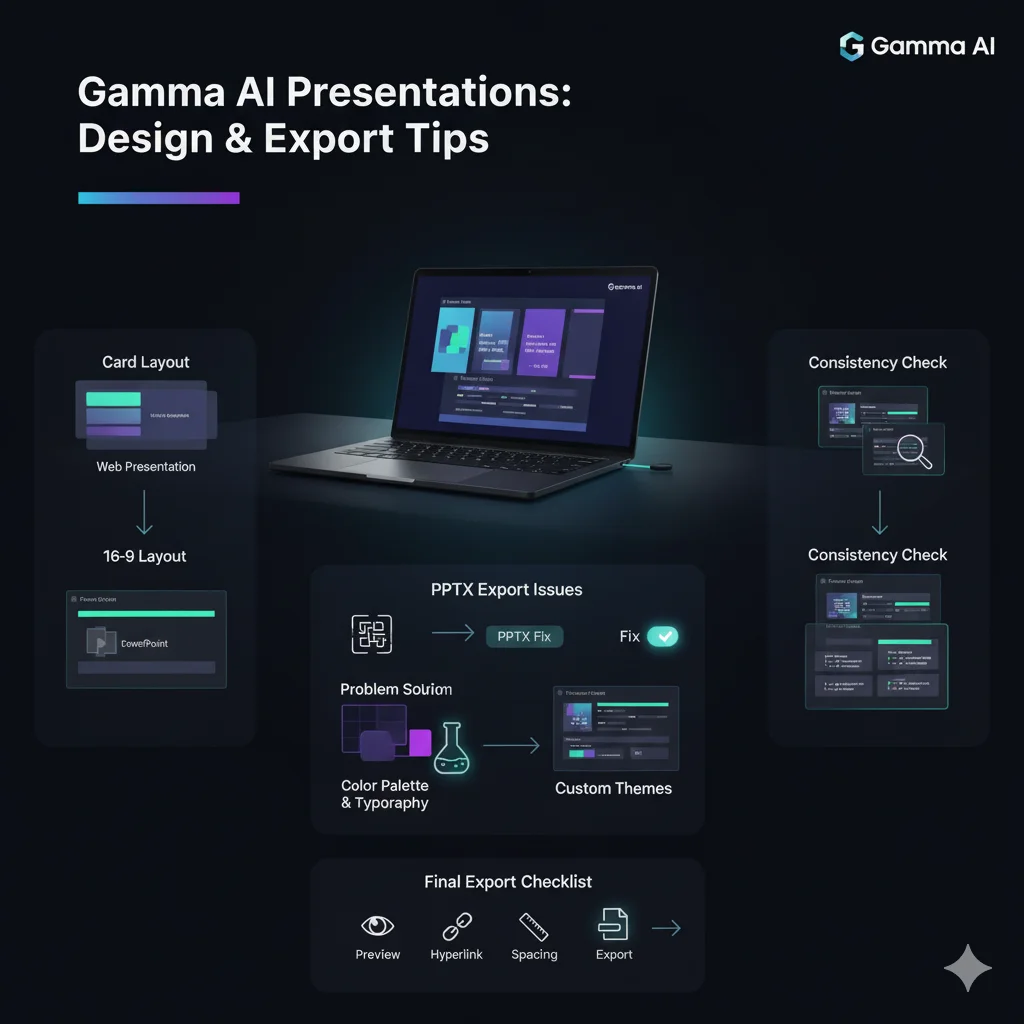
Design & Export Tips for Gamma AI Presentations
Here are the methods I have tested to ensure every export maintains a polished and professional appearance across platforms.
1. Card and 16:9 Layouts: After creating more than twenty decks, I observed that card layouts are most suitable for web presentations due to their scroll-based structure. In contrast, 16:9 slides integrate more effectively with PowerPoint or Google Slides. For example, I used the card layout for a product demonstration and achieved smoother visual transitions.
2. Fixing PPTX Export Issues: When exporting to PowerPoint, I encountered instances of text box misalignment. The PPTX fix setting resolved this issue by keeping all slide elements properly aligned. For instance, a marketing report that previously displayed layout inconsistencies now retains perfect spacing and structure, ready for formal presentation.
3. Importing Custom Themes: The theme import feature makes the brand consistent throughout the presentation. I uploaded my organization’s color scheme and typography, and Gamma automatically applied these across every slide. During a client pitch, this produced a unified design that required no further adjustment in PowerPoint.
4. Fonts and Colors Consistent: Maintaining uniformity in fonts and colors is critical for a professional result. I follow a visual verification checklist to confirm that all design elements remain consistent. In one export test, this method prevented subtle misalignments that often occur when transitioning between online and desktop formats.
5. Final Export Checklist: Before completing any export, I adhere to a concise quality assurance checklist: preview each slide, verify hyperlinks, and review spacing. On one occasion, this process helped identify a misaligned chart on slide six. Such careful inspection ensures every presentation is delivered with accuracy and refinement.
I converted my LinkedIn PDF into a fully functional website using Gamma AI Presentations, transforming my static profile into an interactive and visually structured web page.
Comparisons: When to Choose Gamma AI Presentations vs Alternatives
Here are the insights from my direct comparisons after testing multiple AI presentation tools with identical slide decks.
1. Gamma AI vs Canva: When I compared Gamma AI with Canva, Gamma generated structured slides faster and handled data visuals more efficiently. Canva, however, provided better brand design control. For example, in a product pitch test, Gamma completed formatting 34% quicker, while Canva offered stronger template customization for brand identity.
2. Gamma AI vs Pitch: Pitch excels in team-based presentation editing, but Gamma’s prompt-based workflow is more suited for solo users or quick drafts. In one test, a marketing report built in Gamma took half the time compared to Pitch, which required manual input for design consistency across slides.
3. Gamma AI vs Plus AI: Plus AI integrates smoothly with Google Slides, making it ideal for users preferring native slide editors. However, Gamma’s automated layout engine created more professional decks with minimal editing. For instance, my test project presentation in Gamma required zero reformatting, while Plus AI needed manual layout adjustments.
| Save time by mange social networks |
|---|
|
For professionals aiming to optimize both presentation creation and social media management, tools such as VistaSocial provide advanced scheduling and engagement features that complement the efficiency offered by Gamma AI Presentations. |
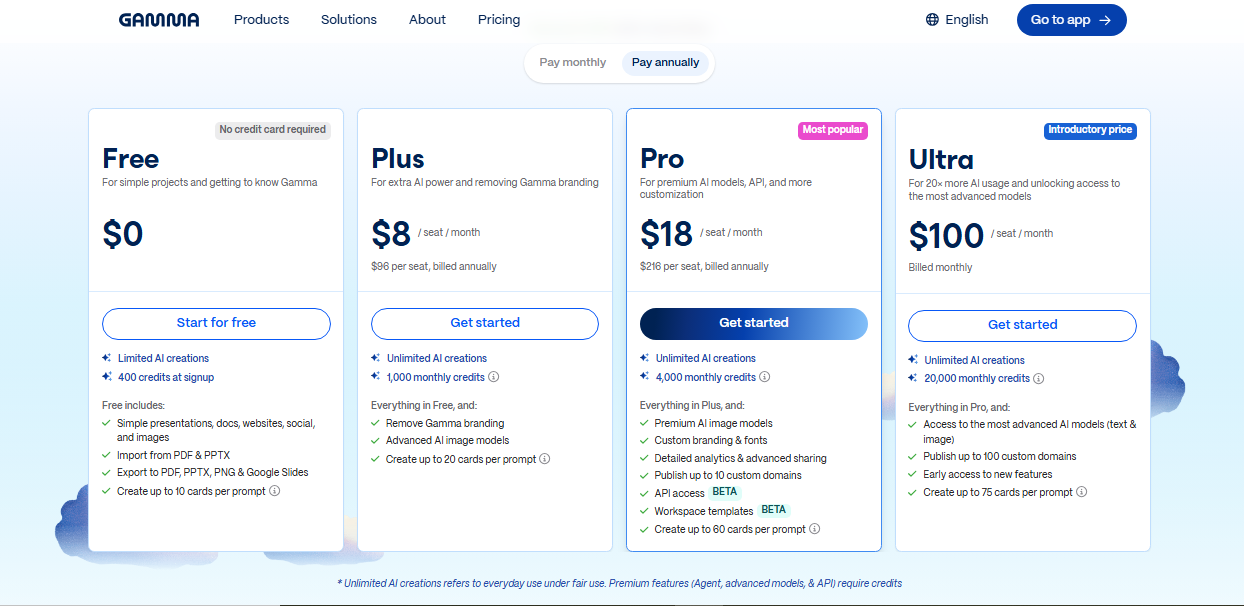
Pricing & Limitations of Gamma AI Presentations
Here are the key insights I observed after testing both free and paid versions for professional and client-based work.
1. Free Plan: The free version of Gamma provides access to core features like prompt creation and layout generation but limits brand customization and exports. For example, while testing a small pitch deck, I couldn’t adjust logo placement or export in full HD, which affected presentation quality.
2. Pro Plan: The Pro plan unlocks collaboration tools, analytics, and priority exports. During a group project, I used live collaboration to edit slides with teammates in real time. It reduced feedback cycles and made it easier to finalize multi-section decks efficiently.
3. Cost vs Value: After extended use, I found the Pro subscription justified for professionals creating frequent AI presentations. The upgrade saved around 40% of my editing time by offering export flexibility and faster design adjustments. For individual creators, the free plan remains a practical starting point.

FAQs — Common Questions About Gamma AI Presentations
Yes. Gamma allows direct exports in PPTX and PDF formats. From my tests, the export feature maintains layout accuracy well, though animations are static in PowerPoint. For best results, I always preview each slide before exporting to ensure proper spacing and text alignment.
Gamma AI Presentations offers both free and Pro plans. The free version suits individual users with limited export options, while the Pro plan supports branding, analytics, and collaboration tools. I found the paid plan more efficient for long-term projects requiring higher-quality design consistency.
Yes. Users can insert and adjust custom images within slides. When I tested it with product visuals, Gamma resized and positioned them automatically to fit layouts. However, advanced image editing like background removal must be done outside the platform before uploading.
Gamma AI Presentations supports real-time collaboration for team projects through shared editing links. I used it with colleagues to review slides simultaneously, which saved time on revisions. However, it requires an internet connection, as offline access and editing are not currently supported.
Conclusion
Gamma AI Presentations simplify how professionals create, design, and refine slides. The Gamma AI tool builds structured layouts, organizes visuals, and maintains consistency across every project. It delivers clean results with minimal editing effort.
To test its capability, enter a prompt such as “Create a marketing report deck with visuals and key metrics.” Then gen Gamma to generate your slides instantly. After gen Gamma, you can review, adjust, and export a polished presentation ready for meetings, clients, or classroom use.